- If you’re not already there navigate to the “receive manufacturer payment” page by clicking on “payments,” then “accounts receivable,” then “vendor,” then “receive payment.”

- Find the invoice you wish to receive a payment for by searching for the invoice number or scrolling through the list of invoices on this page.
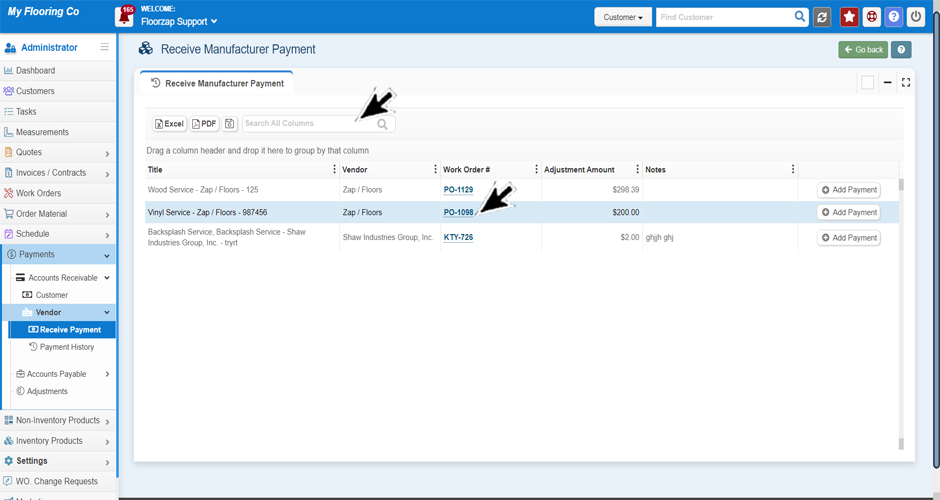
- Click on the “add payment” button on the right side of the screen.

- A new window will open-up. Complete the fields here with the payment details and then click save.

Search Knowledge Base Articles
How do I receive a vendor payment?
Did you find this article useful?
Related Articles
-
Understanding the customer payments page.
Here you will be able to see all payments that have been made, you will be able to sort by status as... -
How do I add a customer payment?
There are two ways you can go about adding a customer payment. Method 1: If you’re not alread... -
How do I send a payment receipt to a customer?
If you’re not already there navigate to the customer payments page. From the left-side of the ... -
How do I view customer payment details?
If you’re not already there navigate to the customer payments page. From the left-side of the ... -
How do I give a full refund to a customer?
If you’re not already there, navigate to the customer payments page. From the left-side of th...